

This was a fun afternoon vibing experiment but, as you may know, new multiagent coordination frameworks come out every hour and orc is definitely not the best one. Think of it as a fun learning tool if you want to hack around with it or if you have some tokens to burn.
 Intense vibing detected
 = brains first tokens last =
The problem
As I started trying out AI-assisted coding, I found myself spending just a little too much time doing various iterations of the same loop:
- describe an issue to an AI
- wait for it to plan the thing and do it
- unleash another AI to review what the first one did
Then I realised that AIs can best first plan a task for themselves (they’re very good at writing plans that they can later follow, and they double down as state that helps in case your AI runs out of context or gets stuck in a loop), so I added a step in front to have a specialized ‘planner’ AI prompt that takes high-level task descriptions or bugs and turns them into detailed plan breakdowns that cheaper models can carry out more efficiently.
And then I realized I was reinventing the average programming team’s engineering loop. (I hear someone whispering in my hear: “Conway’s Law blahblahblah…”)
Wouldn’t it be nice to have a little something that models all of that for me and helps me manage the contexts for the different agents, as well as encode a multi-agent development workflow that can work with arbitrarily complex projects?
… and so like Saruman I sat down in the basement of my dark tower cellar and started cooking some orc.
The solution
Orc is an engineering-team-in-a-shell spec-to-code workflow-based AI orchestrator.
(It’s on pypi as qorc because alas orc was taken, and porc (for Project ORChestrator) was too cheeky even for my standards).
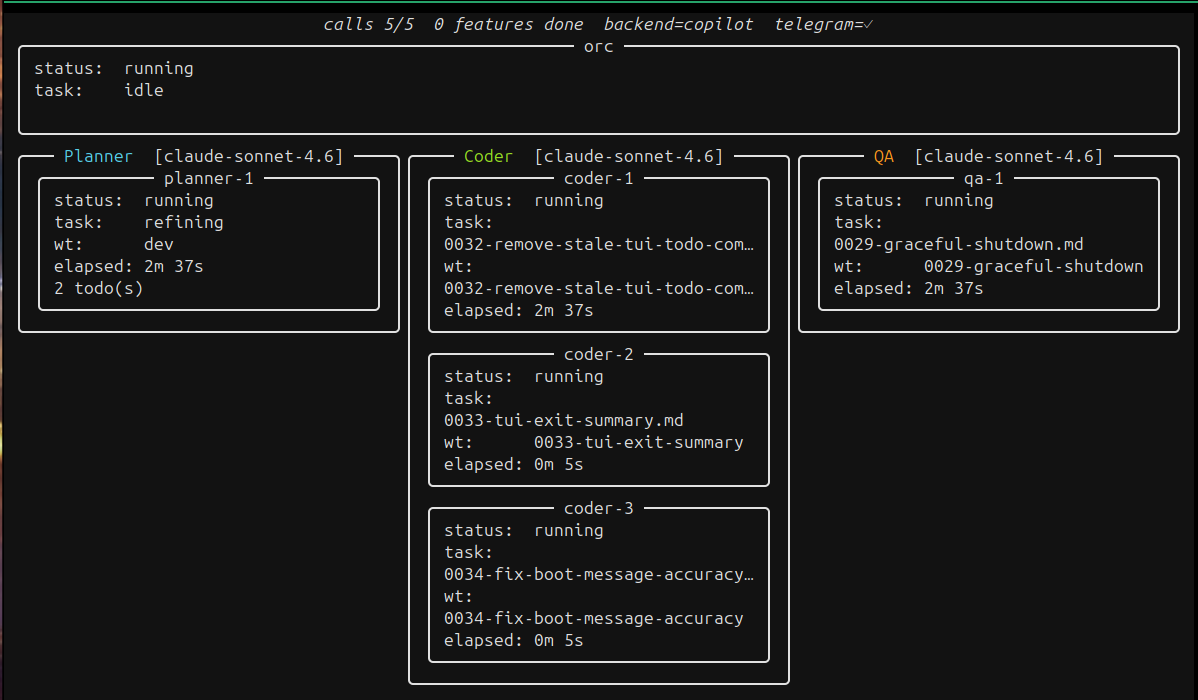
- AI orchestrator: it manages AIs for you, so you don’t have to directly tell them what to do and when.
- spec-to-code: taking your high-level spec documents, in-code TODO/FIXMEs, and bug descriptions to functioning features and code.
- workflow-based: you configure the high-level workflow,
orcdoes the rest. As hands-off as possible. - engineering-team-in-a-shell:
orc’s workflows are modeled after your typical engineering team. There’s various agent roles that correspond to what you’d usually find in an agile team. There’s planners, coders, QA engineers…
High-level architecture
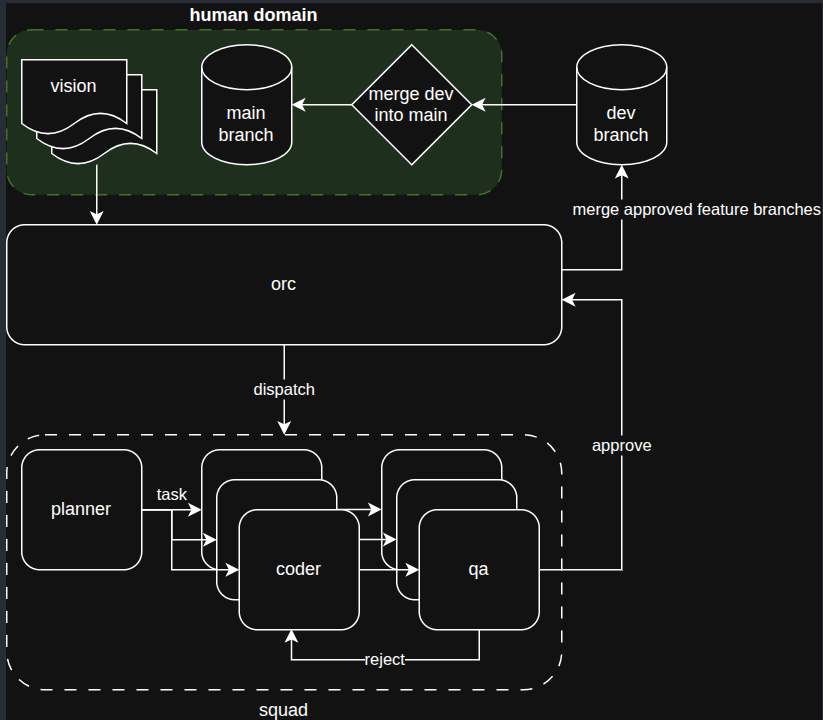
System workflow
Orc runs locally, using a filesystem-based kanban-like model that drives high-level items through an initial ‘refinement’ phase (driven by specialized planner agents).
A single planner (planning to allow scaling that up soon!) refines the project visions, TODOs, FIXMEs, into detailed tasks that an army of cheaper models can carry out.
Future work: Plugin system so orc can integrate with other task management backends such as jira, github issues…
Then Orc dispatches N coder agents in parallel, all working in their own isolated worktree and communicating to Orc’s managed kanban board via a unix-socket-bound local server.
Once the coders are done, the tasks are marked as in review and Orc can dispatch some qa agents to review them (you decide what they’re looking for, and how strict they should be!).
Future work: Fully configurable pipeline, so you can define more agents and set yourself the rules for the state machine (who’s allowed to move tasks between swimlane A and swimlane B), and what each agent 's responsibility is.
All of orc’s work gets pushed to a dev branch (configurable, obviously) that is frequently rebased on main. YOU decide when to merge dev to main. Run orc merge and orc will ensure dev is up to speed with main and let you merge it.
So the AI’s staging worktree is clearly separated from your most important branch, and you can keep working on main without fear of confusing your loyal AI-minions.
Overarching concerns and other features
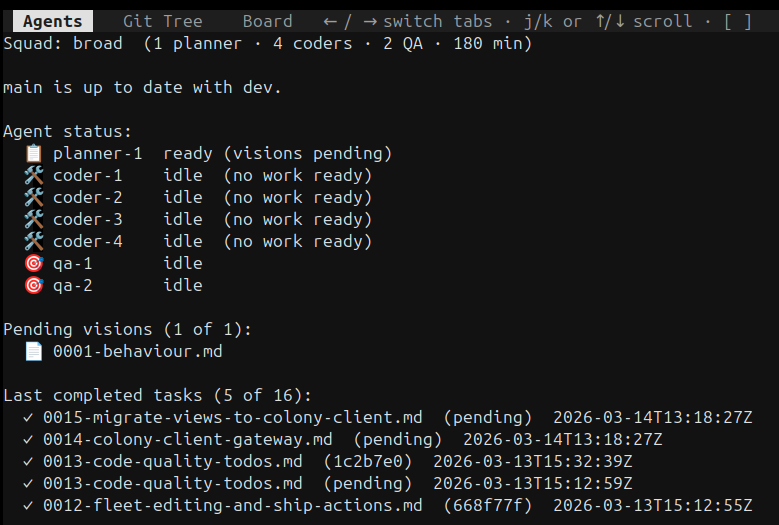
- Inspectable state machine: you can run
orc statusto get the pulse of the system and find out what is being done, or what work would be picked up if you ranorc.
- Bootstrap and get started with
uv run --with qorc orc bootstrap! - Centralized logging and inspection with
orc logs.orc - Keep a cork on the djinn’s bottle by setting a hard ‘maximum number of agent calls’ with
orc run --maxcalls 10.
Future work: allow setting budget in other ways (token usage limit?).
- The configuration for the pipeline as well as the agent instructions live in your project.
- You can define multiple
squadconfigurations and pick one withorc run --squad broad:
# .orc/squads/default.yaml
name: broad
description: High-throughput squad for large projects.

permissions:
  mode: confined             # "confined" (default) or "yolo"
  allow_tools:
    - "shell(just:*)"
  deny_tools:
    - "shell(git push:*)"

composition:
  - role: planner
    count: 1
    model: claude-sonnet-4.6
  - role: coder
    count: 4
    model: claude-sonnet-4.6
    permissions:
      allow_tools:
        - "shell(npm:*)"
        - "shell(cargo:*)"
  - role: qa
    count: 2
    model: claude-sonnet-4.6
    review-threshold: HIGH

timeout_minutes: 180
- You decide what the agents can and cannot do by configuring a project-wide MCP allow/denylist (see example just above).
- Support for
copilotandclaudeCLI backends (need to be installed locally).
Future work: support more? Or allow using regular http endpoints instead.
- Agents can sometimes unblock themselves (a coder can ask clarification to a planner, a QA agent can tell a coder to go fix something), but when they can’t, they surface the issue to the project owner over a telegram channel.
- Telegram integration so you get notified when an agent starts working on something or is
stuck.
Future work: Why just telegram? Support more backends.
Fun facts
orcdeveloped about 50% of its own codebase and functionality as a way of dogfooding. So don’t be shy with feature requests, it’s not like I’ll be doing much of that work.orc’s nickname is “Devourer of Tokens”.
Report issues and contribute
If the large number of future work notes didn’t drive the message home yet: it’s early days still, and the whole thing was vibe-coded in weekends and evenings so it’s guaranteed to have sharp edges and subtle bugs. But fear not, opus is an excellent debugger. Report any issues you may find via GH’s issue tracker.