
Summary
The purpose of this setup is to automate the provisioning of a fresh Ubuntu device. To do this, I use 3 main tools: Multipass (VMs), Chezmoi ($Home dir config mgmt), Just (task runner).
Multipass
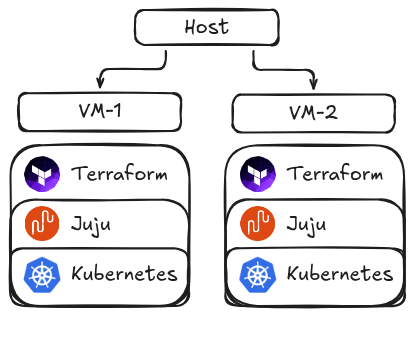
I run everything in Ubuntu VMs (for security) and mount my host’s ~/work directory into these VMs, for syncing my Git repos and setup recipes between them.
Chezmoi
Everything is managed in my dot files GitHub repo. It is private for security reasons. Once the chezmoi (git) state is applied to my host, the machine is configured like my old one.
Justfiles
Justfile recipes are executed during init and can be used post-init to, reproducibly, set up some feature again. E.g. You borked Juju? No problem, just run the Juju recipe again.
Prerequisites
1. chezmoi and just installed on your host
2. Setup chezmoi for backing up your dotfiles / $HOME
- Create a private (or public) repo in your GitHub named
dotfiles - Add any config files that you want to sync between your machines (e.g.
chezmoi add ~/.gitconfig) - This is what my (pruned) config state looks like:
tree /home/ubuntu/.local/share/chezmoi
├── dot_gitconfig
├── dot_zshrc
├── misc
│   ├── cloud-init.yaml
│   ├── justfiles
│   │   ├── canonical.just
│   │   ├── init.just
│   │   └── post-init.just
└── work
    └── canonical
        └── repos
            └── agents.md
.configbecomesdot_configinchezmoinotation~/work/canonical/reposis where I clone mydotfilesrepo (and others) into. Update this if needed.- All files under the
miscdirectory are my custom setup scripts. See the Misc section for details.
3. .zshrc config
Add this function to your .bashrc or .zshrc file:
charm-dev-new() {
  just -f ~/work/canonical/repos/dotfiles/misc/justfiles/init.just charm-dev-new "$1"
}
Note: Update charm-dev to the name of the VM you prefer.
Setup a fresh VM
Great, now you have your $HOME dir state backed up, a shell function, and the necessary tools installed! The new goal is to set up the VM(s) with the following commands:
charm-dev-new foo- Launches a
multipassVM namedcharm-dev-foo - Cloud-init manages the initial config of a VM, e.g. git & shell
- Mounts the
~/workdir into the VM - Copies the host’s (fine-grained) git auth/signing private key into the VM
- Ensure that this is authorized in GitHub SSH settings
- Runs the
post-initandcanonicaljustfile recipes to finish setting up the host - The
canonical.justatuinrecipe- You can remove the recipe, but you will lose command history syncing between VMs
- Launches a
multipass shell charm-dev-foo- Shells into the VM for interaction
Sync your shell history with Atuin
Warning: this requires creating an account and logging in on a fresh VM.
You can add the following atuin recipe for syncing your shell history between VMs with Atuin:
atuin:
    curl --proto '=https' --tlsv1.2 -LsSf https://setup.atuin.sh | sh
    . "$HOME/.atuin/bin/env" && atuin login -u "charm-dev"  # Note: pswd & key in BitWarden
Misc files
Add any packages, snaps, binaries you want to the canonical or post-init justfiles.
- Update
git@github.com:MichaelThamm/dotfiles.gitwith your repo source.
init.just
set working-directory := "/"

charm-dev-new id:
    multipass launch -n charm-dev-{{id}} -m 16G -c 8 -d 50G --cloud-init ~/work/canonical/repos/dotfiles/misc/cloud-init.yaml
    multipass stop charm-dev-{{id}}
    multipass mount -t native ~/work charm-dev-{{id}}:~/work
    cat ~/.ssh/charm-dev | multipass exec charm-dev-{{id}} -- bash -c "mkdir -p ~/.ssh && cat > ~/.ssh/charm-dev && chmod 600 ~/.ssh/charm-dev"
    multipass exec charm-dev-{{id}} -- bash -c "/snap/bin/chezmoi init --apply --ssh git@github.com:MichaelThamm/dotfiles.git"
    multipass exec charm-dev-{{id}} -- bash -c "just -f ~/work/canonical/repos/dotfiles/misc/justfiles/post-init.just install-all-vm"
    multipass exec charm-dev-{{id}} -- bash -c "just -f ~/work/canonical/repos/dotfiles/misc/justfiles/canonical.just install-all"
cloud-init.yaml
#cloud-config
package_update: true
packages:
  - zsh
  - fzf

write_files:
  - path: /home/ubuntu/.ssh/config
    owner: ubuntu:ubuntu
    permissions: '0644'
    defer: true
    content: |
      Host github.com
          HostName github.com
          User git
          IdentityFile /home/ubuntu/.ssh/charm-dev
          IdentitiesOnly yes

runcmd:
  # Avoid "Are you sure you want to continue connecting (yes/no/[fingerprint])?"
  - ssh-keyscan -H github.com >> /home/ubuntu/.ssh/known_hosts

  # ---Install Snaps---
  - $(which snap) install just --classic
  - $(which snap) install chezmoi --classic

  # ---Setup Shell---
  - sudo -u ubuntu sh -c "$(curl -fsSL https://raw.githubusercontent.com/ohmyzsh/ohmyzsh/master/tools/install.sh)" "" --unattended
  - chsh -s $(which zsh) ubuntu
  - $(which git) clone https://github.com/zsh-users/zsh-autosuggestions /home/ubuntu/.oh-my-zsh/custom/plugins/zsh-autosuggestions
  - $(which git) clone https://github.com/zsh-users/zsh-syntax-highlighting /home/ubuntu/.oh-my-zsh/custom/plugins/zsh-syntax-highlighting
post-init.just
install-all: languages utils
install-all-vm: install-all vm-specific

[group('install')]
languages:
    sudo snap install terraform --classic
    # GoLang
    sudo snap install go --classic
    mkdir -p ~/.local/go && export GOPATH=~/.local/go && go install github.com/charmbracelet/gum@latest
    # Python
    sudo snap install astral-uv --classic
    sudo apt install -y tox

[group('install')]
vm-specific:
    sudo apt install -y gnome-keyring

[group('install')]
utils:
    sudo snap install yq
canonical.just
microk8s-channel := '1.35-strict/stable'
ck8s-channel := '1.34-classic/stable'
juju-channel := '3.6/stable'
ipaddr := `ip -4 -j route get 2.2.2.2 | jq -r '.[] | .prefsrc'`
git-dir := '~/work/canonical/repos'

install-all: ck8s lxd craft juju
purge-host: purge-ck8s purge-juju

default:
  just --list

ck8s:
    sudo snap install k8s --classic --channel={{ck8s-channel}}
    sudo k8s bootstrap
    sudo k8s status --wait-ready
    sudo k8s enable local-storage
    sudo k8s enable load-balancer
    sudo k8s set load-balancer.l2-mode=true load-balancer.cidrs="{{ipaddr}}/32"
    sudo k8s status --wait-ready
    mkdir -p ~/.kube
    sudo k8s config | tee ~/.kube/config > /dev/null

[group('install')]
lxd:
    sudo snap install lxd
    sudo usermod -aG lxd $USER
    sg lxd -c "lxd init --auto"

[group('install')]
craft:
    sudo snap install rockcraft --classic
    sudo snap install charmcraft --classic
    sudo snap install snapcraft --classic
    sudo snap install sourcecraft --classic --channel latest/beta

[group('install')]
juju:
    sudo snap install juju --channel={{juju-channel}}
    juju bootstrap localhost lxd
    juju bootstrap k8s ck8s

    # Jhack
    sudo snap install jhack --channel=latest/edge
    sudo snap connect jhack:dot-local-share-juju snapd
    sudo snap connect jhack:ssh-read snapd
    mkdir -p ~/.config/jhack
    jhack conf destructive | tee ~/.config/jhack/config.toml > /dev/null

[group('purge')]
purge-ck8s:
    sudo snap remove k8s --purge
    rm -rf ~/.kube

[group('purge')]
purge-juju:
    sudo snap remove juju --purge
    rm -rf ~/.local/share/juju
Conclusion
You have achieved a one-liner charm-dev deploy shell function (charm-dev-new foo) with:
- Git auth and signing
Juju,k8s,*craftinstalled- Shell history sync between VMs
- Custom
$HOMEconfig
The best part; you can configure it how you want. This serves as a framework for reproducible and configurable dev setups.
Having charm-dev-new execute just recipes (which are mounted) means you can edit them (on host or any VM), and those changes are propagated throughout the mount. Therefore, if your shell function doesn’t change, you never even need to open a new shell, i.e. unlike .bashrc and .zshrc changes.
Prior arts: