
When I was working in Observability at CERN, one of the things I appreciated the most was the “public screen”. At the entrance of the IT building there was a monitor showing an overview dashboard for all the services we monitored; lots of little green squares, one per service, which would turn red when something went down. The first thing I would see in the morning when arriving at my office was that screen, and it would let me know immediately if my day was going to start with a nice coffee or an emergency meeting.
However, services are not the only thing that can fail. Before anything is running, you need to get through the codebase: lots of repositories with their own CI automation, release schedule, and issues. What happens when you manage 100+ repositories across the organization? How confident are you in your knowledge of the CI status of each one at any given time? Which repositories tend to have long-forgotten issues from 10 years ago?
Being an Observability lead at Canonical, I aim for engineering excellence; I want to solve this problem long-term, by improving our processes and by giving the team the same thing that screen gave me: a single place to look, that tells you when something needs your attention. Truth is, I didn’t find a tool that would do that across all of our repositories.
So I wrote Grimoire.
A health dashboard for your repositories
Grimoire is a monitoring dashboard for GitHub repositories which allows me to track their health: this includes CI statuses, stale PRs and issues, all the way to custom checks.
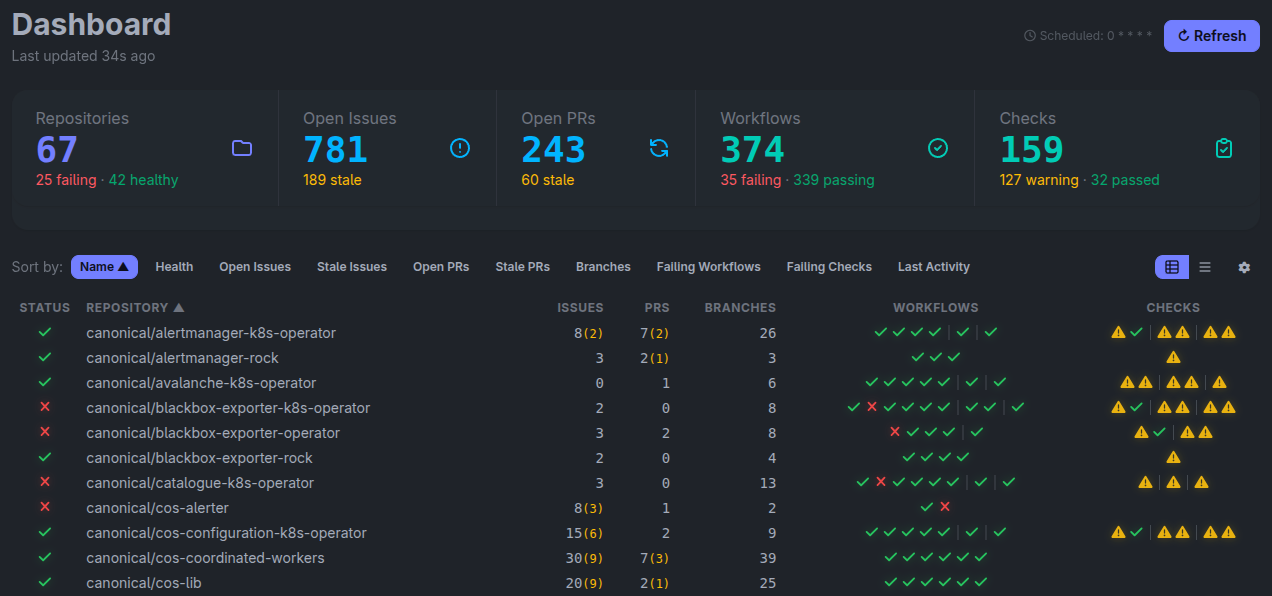
You point it at the repositories you care about, and you get the view I was missing: one row per repository, one screen for all of them. Open and stale issues, open and stale pull requests, and a badge grid showing at a glance which workflows are passing and which aren’t.
I keep this dashboard on my second monitor throughout the day: the data is updated every hour, which allows me to quickly jump on issues as soon as they happen. However, not all problems are immediately visible through CI status. What if the lockfile in your project is outdated because Renovate’s pull request failed workflows on a random network blip? What if you want to check whether any issue or PR from an external contributor hasn’t been addressed by the team?
Grimoire lets you define your own checks: a small script, plus a rule for which repositories and branches it should run against. It runs everywhere, on a schedule, and turns into one more green or red badge on the dashboard.
Now that we “solved” the Observability side of things, and we have this wonderful overview of our repositories’ health, there’s still one problem which I conveniently left out of my initial story. The first time I walked into the IT building, I had no idea what I was looking at: the extent of my understanding was “more red means bad”, with no extra context on what was important and what wasn’t.
What should you fix first? How do you convert the overview information into an actionable list of things to fix? Via the Backlog page!
Turning noise into a priority list
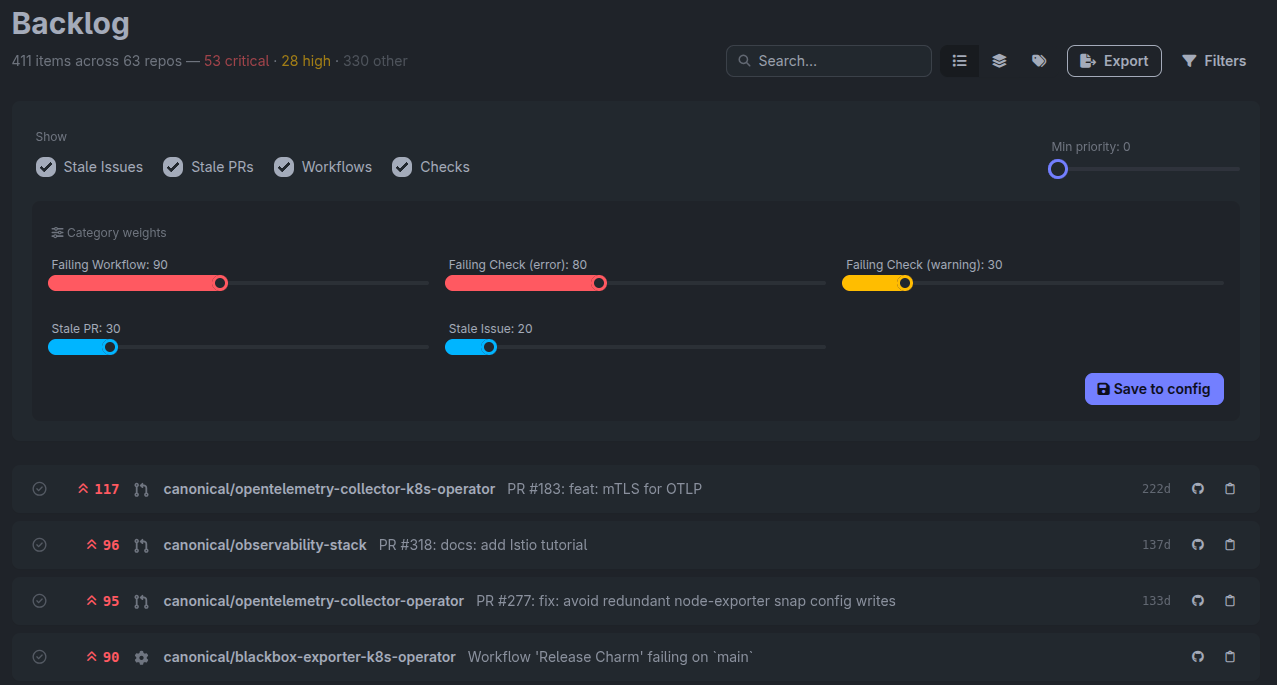
The backlog page flattens every problem Grimoire knows about into a single ranked list, scoring each item by how much that kind of problem matters, how important the repository is, and how long the problem has been sitting there. The weights are yours to tune: a failing release workflow can outrank a failing linter, and a repository you’ve deliberately parked can be excluded entirely.
You can group the list by repository, which tells you where to spend an afternoon, or by problem type, which tells you when one systemic fix would clear twenty items at once. After tailoring the weights to your team’s needs, this page will always show you the most important things to tackle in order, so nobody has to spend their morning deciding where to start.
Measuring trends, not just the snapshot
The Observability picture wouldn’t be complete without historical data. Grimoire exposes everything it knows as metrics, which allows you to visualize trends and identify pain points to discuss with the team.
I’ve been running Grimoire against the Observability team’s repositories for a few months now, and I can already measure the positive impact from this tool: roughly 50% fewer failing workflows at any given time, and about 10% less staleness across issues and pull requests.
Conclusions
Grimoire is open source and self-hostable, and getting it running only takes a GitHub token and a YAML file. The code lives on GitHub, and the documentation will walk you through your first steps.
I hope you give it a try, and that it helps your team spend less time wondering about the state of your repositories, and more time improving them.
As for me, I finally have my public screen back. I sit at my desk in the morning, I glance at the second monitor, and I know right away whether today starts with a coffee or with an emergency meeting. Most days, it’s the coffee. 
