
Abstract
Operating production-ready Kubernetes clusters and making them efficient at scale is no small task. Balancing governance, performance, and costs requires careful planning, especially when user-driven workloads come into the equation. In this post, we will present how we address part of this complex challenge through the prism of advanced scheduling: keeping control of where pods are scheduled and executed in the cluster, and how Juju and charms can make this easy.
Introduction
Kubeflow and Apache Spark are two popular analytics tools commonly found in production Kubernetes clusters, especially with the rise of AI and ML workloads. By their very nature, they exacerbate the challenges of operating Kubernetes at scale:
- Analytic workloads benefit from specialized hardware such as high-memory nodes, custom hardware resources such as GPUs, or specific architecture, while we want control-plane operation to remain stable on cost-effective instances.
- They require the flexibility to scale down idle resources to keep costs constrained, especially if they need costly specialized hardware. On the other hand, parallel processing helps to achieve high velocity and low latency: this is where scaling out resources is key.
- Resource utilization is highly volatile: a single job completion can release a considerable amount of resources, while cold starts impair interactive analyses. Flexibility is not enough; speed in resource allocation and deallocation is also required.
- Decoupling those heavy workloads from control-plane operations is crucial to not starving system services for CPU, memory, and IO, therefore keeping them stable.
For all the reasons above, it is recommended to run analytics workloads in dedicated worker pools. Today I’m joined by @mattiasarti to present a few strategies to use advanced scheduling on Kubernetes clusters.
Advanced scheduling
Prerequisites
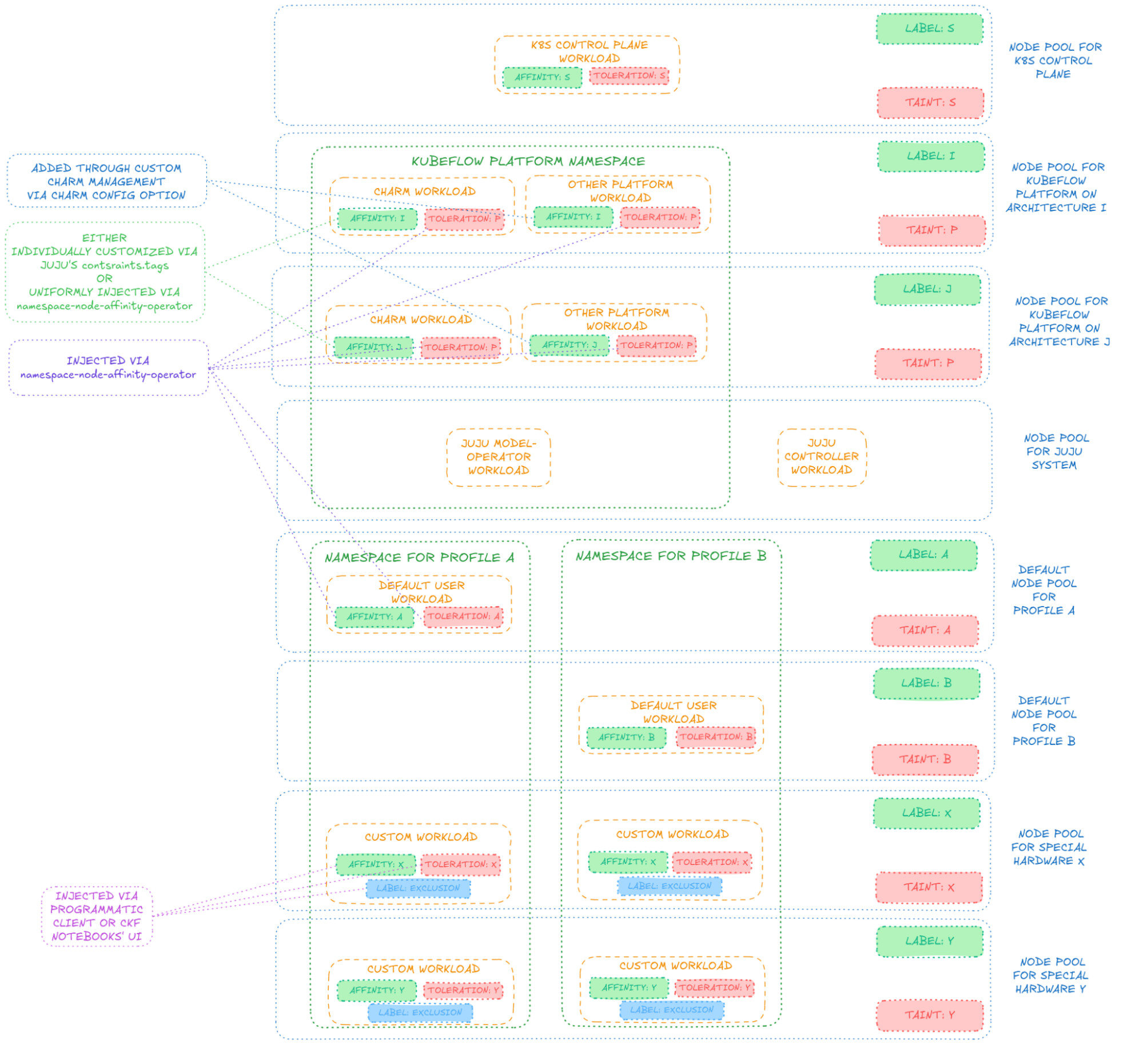
Let’s create a K8s cluster with multiple node pools, each one meant for different workloads, with respective (sets of) node labels and taints for all of them but the one for Juju-system workloads:
- One for K8s-control-plane workloads
- One for Juju-system workloads (such as controllers and model operators), the only unlabeled and untainted one
- One for Kubeflow-platform workloads
- One for Spark-platform workloads (for arm64 charms)
- One or more for default Kubeflow-user workloads (defaults selected for each user Profile)
- One or more for customized Kubeflow-user workloads (non-default, explicitly configured)
- One or more for Spark-user workloads (arm64)
Achieving, for instance, this node state — with a single node for each pool:
kubectl get nodes
NAME                                STATUS   ROLES    AGE     VERSION
aks-a-33719789-vmss000000           Ready    <none>   7d8h    v1.32.10
aks-b-75544582-vmss000000           Ready    <none>   7d7h    v1.32.10
aks-juju-38601234-vmss000000        Ready    <none>   7d8h    v1.32.10
aks-k8s-27176324-vmss000000         Ready    <none>   7d8h    v1.32.10
aks-k8s-27176324-vmss000001         Ready    <none>   7d8h    v1.32.10
aks-kubeflow-38183491-vmss000000    Ready    <none>   7d8h    v1.32.10
aks-spark-11830284-vmss000000       Ready    <none>   25h     v1.32.10
aks-sparkjobs-28125035-vmss000000   Ready    <none>   7m21s   v1.32.10
aks-x-76501254-vmss000000           Ready    <none>   7d7h    v1.32.10
Node name prefixes represent their pool’s purpose, being for Kubeflow users “a” and “b” different default pools and “x” a special-hardware one.
For Charmed Kubeflow, the depicted schema is generally achievable, despite the fact we will keep Kubeflow-platform workloads on a single node pool in this article:
Deploying CKF
Once all node pools are set up, we bootstrap our Juju controller, which will automatically land on the node pool for Juju-system workloads (being the only untainted one).
To control where to schedule pods, we then make (heavy) use of our Namespace Node Affinity Operator, a charm that operates a MutatingAdmissionWebhook to inject pods with desired node affinity and tolerations in a way that is configurable to the charm user for each namespace, to target desired node pools for any Juju models of interest. First off, we create a Juju model to deploy the Namespace Node Affinity Operator and we configure it (via its charm config option) to inject pods scheduled to the namespace of the Kubeflow platform with node affinity and tolerations respectively for node labels and taints for the Kubeflow-platform node pool. An example may be:
juju add-model namespace-node-affinity
juju switch namespace-node-affinity

juju deploy --trust --channel 2.2/stable --revision 248 namespace-node-affinity
juju wait-for application namespace-node-affinity

namespace_node_affinity_settings=$(cat << EOF
kubeflow: |
  excludedLabels:
    exclude-me-from-namespace-node-affinity-operator: "true"
  nodeSelectorTerms:
    - matchExpressions:
      - key: kubeflow-platform
        operator: Exists
  tolerations:
    - effect: NoSchedule
      key: kubeflow-platform
      operator: Exists
EOF
)
juju config namespace-node-affinity settings_yaml="$namespace_node_affinity_settings"
The pods of this operator itself will be randomly scheduled to any node pool free of taints — in this case the one for Juju-system components, being the only untainted one. If one prefers to have them in the same namespace as the Kubeflow platform, a latter instance of the same operator can be instantiated, so that it is in turn injected by the former one to have it scheduled to the desired node pool, eventually removing the former instance once the latter is deployed and configured, keeping the node pool for Juju-system components free from anything that is not Juju controller pods or model-operator pods.
At this point, we create the Juju model for the Kubeflow platform and we label its corresponding namespace to allow the Namespace Node Affinity Operator to affect pods in that same namespace by running:
juju add-model kubeflow
kubectl label namespaces kubeflow namespace-node-affinity=enabled
Mind that model-operator pods, responsible for managing the lifecycle of a particular model, will always be created before models’ namespaces are labeled to enable Namespace Node Affinity Operator and will never be injected with node affinity and tolerations, therefore ending up in the unlabeled and untainted node pool for Juju-system components, as desired.
At this point, we deploy Charmed Kubeflow in any way we prefer, without specifying any extra constraints, and all Kubeflow-platform pods will automatically be injected with node affinity and tolerations to land on the Kubeflow-platform namespace.
It is worth noting that, among the charms of the Kubeflow platform, one is in charge of creating namespaces for Kubeflow users (technically, “Kubeflow Profiles”), where user workloads (the actual “machine learning stuff”) are run, and such namespaces will already be created with labels to enable the Namespace Node Affinity Operator to modify pod requests to those same namespaces. Therefore, we can then extend the configurations of the Namespace Node Affinity Operator to configure node affinity, tolerations and exclusion labels for namespaces corresponding to (not-yet-created) Kubeflow Profiles so that each Profile can target the respective desired default node pool for its user workloads. For example:
namespace_node_affinity_settings=$(cat << EOF
kubeflow: |
  excludedLabels:
    exclude-me-from-namespace-node-affinity-operator: "true"
  nodeSelectorTerms:
    - matchExpressions:
      - key: kubeflow-platform
        operator: Exists
  tolerations:
    - effect: NoSchedule
      key: kubeflow-platform
      operator: Exists
profile-i: |
  excludedLabels:
    exclude-me-from-namespace-node-affinity-operator: "true"
  nodeSelectorTerms:
    - matchExpressions:
      - key: kubeflow-default-node-pool
        operator: In
        values:
          - a
  tolerations:
    - effect: NoSchedule
      key: kubeflow-default-node-pool
      operator: Equal
      value: a
profile-j: |
  excludedLabels:
    exclude-me-from-namespace-node-affinity-operator: "true"
  nodeSelectorTerms:
    - matchExpressions:
      - key: kubeflow-default-node-pool
        operator: In
        values:
          - a
  tolerations:
    - effect: NoSchedule
      key: kubeflow-default-node-pool
      operator: Equal
      value: a
profile-k: |
  excludedLabels:
    exclude-me-from-namespace-node-affinity-operator: "true"
  nodeSelectorTerms:
    - matchExpressions:
      - key: kubeflow-default-node-pool
        operator: In
        values:
          - b
  tolerations:
    - effect: NoSchedule
      key: kubeflow-default-node-pool
      operator: Equal
      value: b
EOF
)
juju config namespace-node-affinity settings_yaml="$namespace_node_affinity_settings"
Running CKF workloads
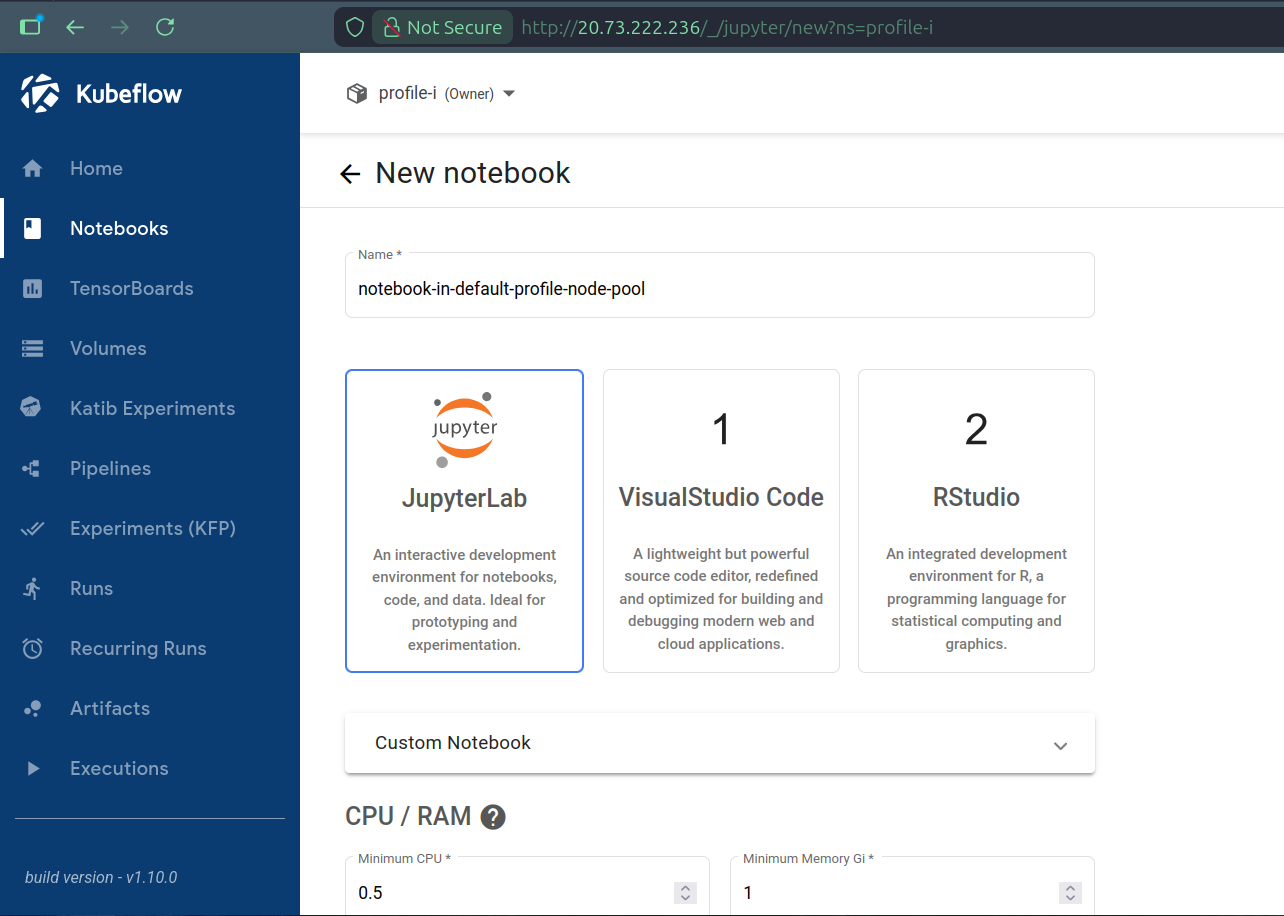
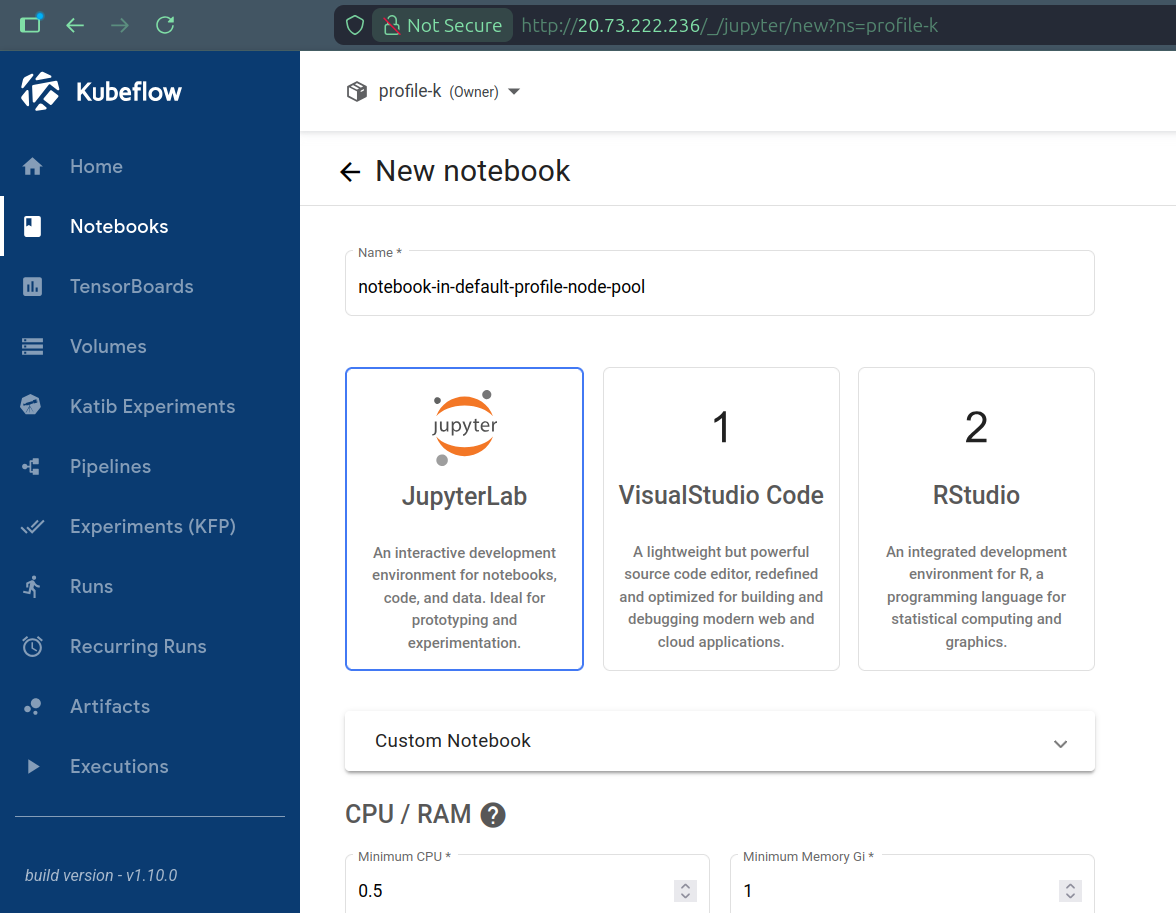
We can finally create Kubeflow Profiles and Kubeflow users can start using the Kubeflow platform to run workloads, automatically seeing them scheduled to the default node pools of their respective Profiles. For instance, creating a Notebook from the Dashboard results in it being scheduled to node pool A if we do from Profile I and to node pool B if we do from Profile K:
kubectl get pods -o wide -n profile-i
NAME                                               READY   STATUS    RESTARTS   AGE   IP             NODE                        NOMINATED NODE   READINESS GATES
ml-pipeline-ui-artifact-6d575b7484-l7k64           2/2     Running   0          8h    10.244.4.100   aks-a-33719789-vmss000000   <none>           <none>
ml-pipeline-visualizationserver-68fd78454f-58jcc   2/2     Running   0          8h    10.244.4.118   aks-a-33719789-vmss000000   <none>           <none>
notebook-in-default-profile-node-pool-0            2/2     Running   0          27s   10.244.4.56    aks-a-33719789-vmss000000   <none>           <none>
kubectl get pods -o wide -n profile-k
NAME                                               READY   STATUS    RESTARTS   AGE     IP             NODE                        NOMINATED NODE   READINESS GATES
ml-pipeline-ui-artifact-6d575b7484-jv8lm           2/2     Running   0          11h     10.244.5.117   aks-b-75544582-vmss000000   <none>           <none>
ml-pipeline-visualizationserver-68fd78454f-48d8j   2/2     Running   0          11h     10.244.5.60    aks-b-75544582-vmss000000   <none>           <none>
notebook-in-default-profile-node-pool-0            2/2     Running   0          2m41s   10.244.5.153   aks-b-75544582-vmss000000   <none>           <none>
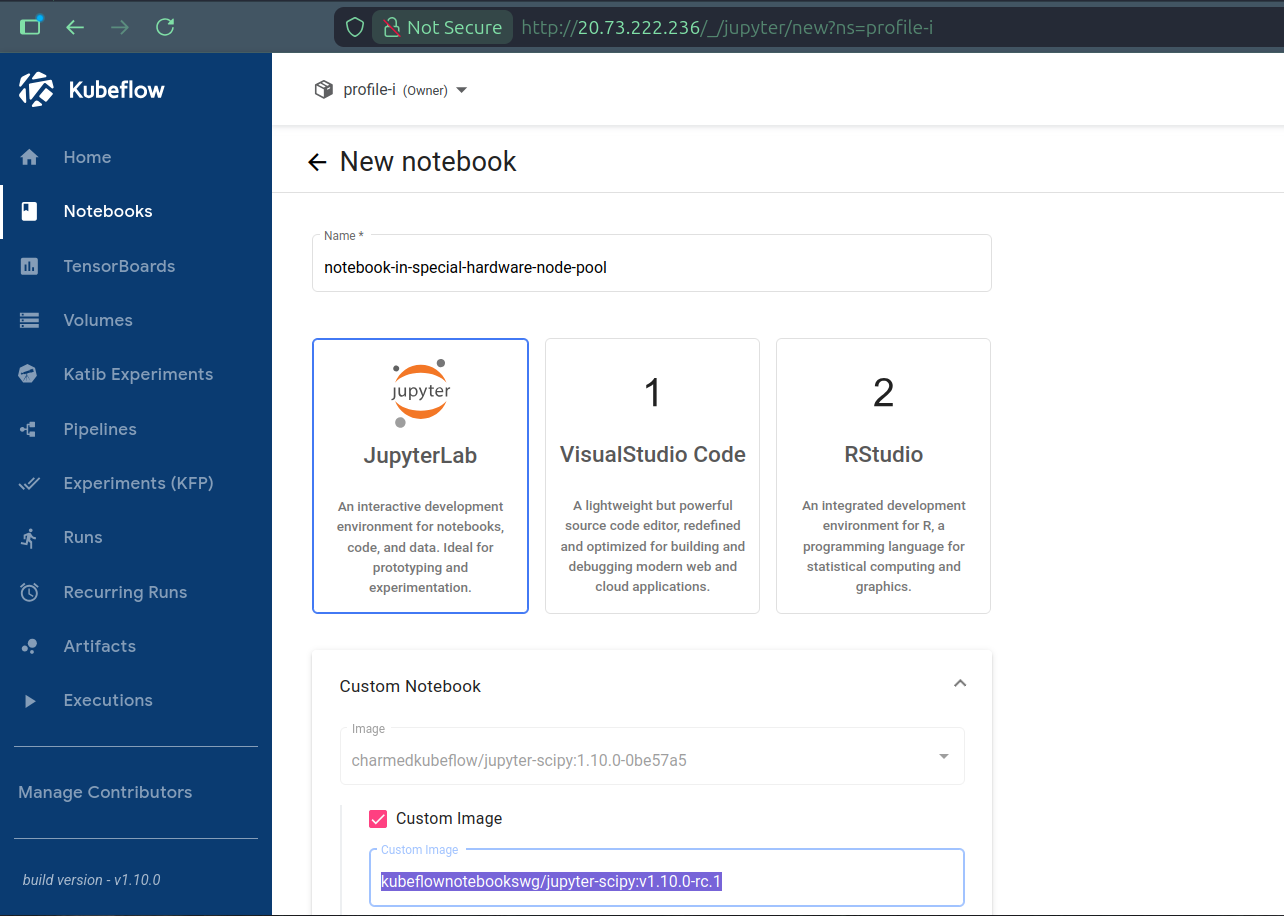
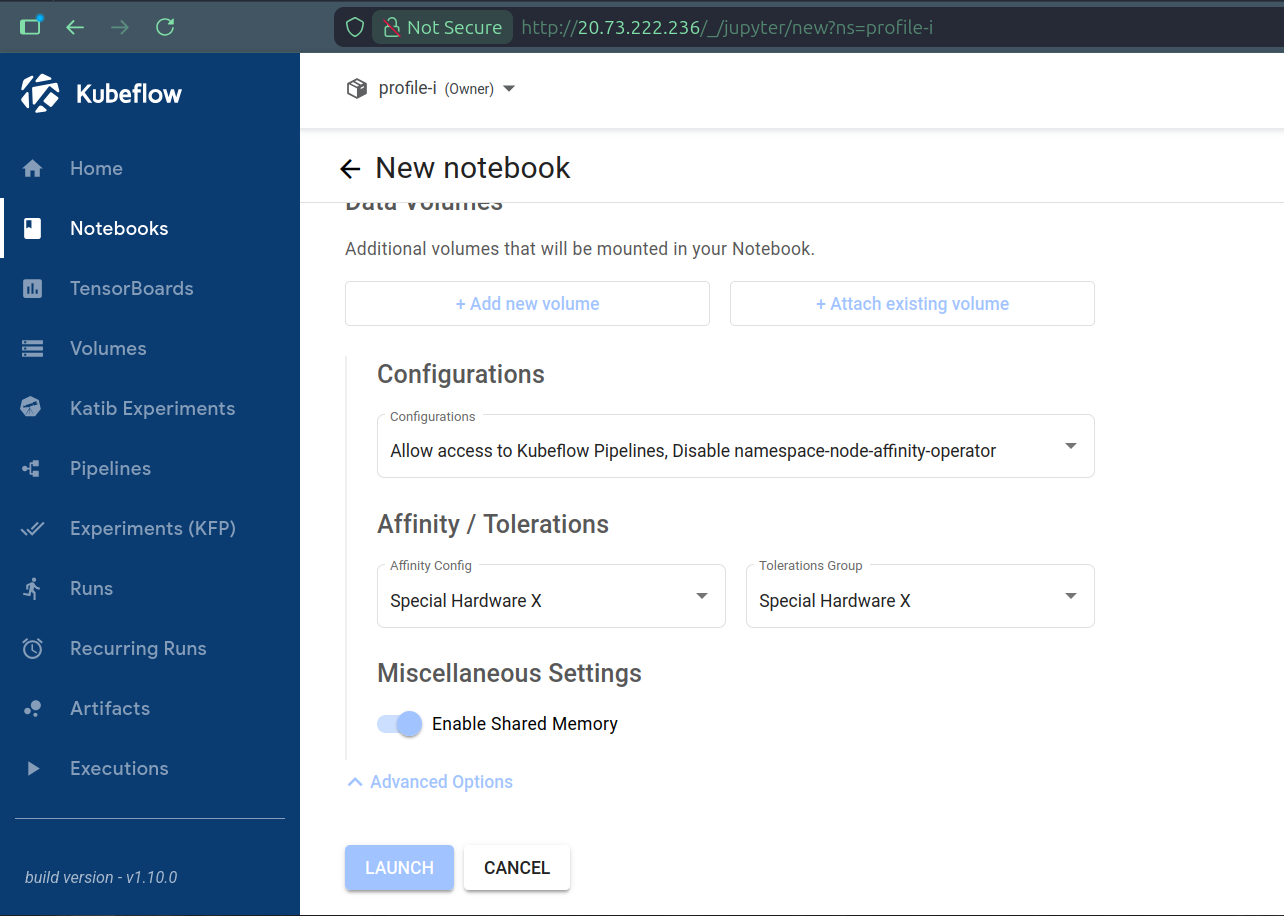
In case we want to target different node pools than the default one for specific workloads, for example to select special hardware, we can define individual workloads with i) labels to selectively disable the configured behavior of Namespace Node Affinity Operator, ii) node affinity to the desired node pool’s labels and iii) tolerations for the desired node pool’s taints. In other words, we can always opt-out from the default manipulation of pod requests, to define our own node affinity and tolerations, at the level of single workloads. For example, still to create a Notebook from the Dashboard, but this time on some node pool labeled and tainted for special hardware representing ARM64 CPU architecture, we can select preconfigured PodDefaults (to add labels), node affinity and tolerations for the Notebook’s workload:
kubectl get pods -o wide -n profile-i
NAME                                               READY   STATUS    RESTARTS   AGE   IP             NODE                        NOMINATED NODE   READINESS GATES
ml-pipeline-ui-artifact-6d575b7484-l7k64           2/2     Running   0          8h    10.244.4.100   aks-a-33719789-vmss000000   <none>           <none>
ml-pipeline-visualizationserver-68fd78454f-58jcc   2/2     Running   0          8h    10.244.4.118   aks-a-33719789-vmss000000   <none>           <none>
notebook-in-special-hardware-node-pool-0           2/2     Running   0          32s   10.244.6.83    aks-x-76501254-vmss000000   <none>           <none>
Where “Configurations” (PodDefaults), “Affinities” and “Tolerations” could be preconfigured for the Dashboard by running:
affinity_options=$(cat << EOF
- configKey: special_hardware_x
  displayName: "Special Hardware X"
  affinity:
    nodeAffinity:
      requiredDuringSchedulingIgnoredDuringExecution:
        nodeSelectorTerms:
          - matchExpressions:
              - key: special-hardware
                operator: In
                values: [x]
EOF
)
tolerations_options=$(cat << EOF
- groupKey: special_hardware_x
  displayName: "Special Hardware X"
  tolerations:
    - key: special-hardware
      operator: Equal
      value: x
      effect: NoSchedule
EOF
)
juju config jupyter-ui affinity-options="$affinity_options"
juju config jupyter-ui tolerations-options="$tolerations_options"

for profile_name in profile-i profile-j profile-k;
do
kubectl apply -f - << EOF
apiVersion: kubeflow.org/v1alpha1
kind: PodDefault
metadata:
  name: disable-namespace-node-affinity-operator
  namespace: $profile_name
spec:
  desc: "Disable namespace-node-affinity-operator"
  selector:
    matchLabels:
      disable-namespace-node-affinity-operator: "true"
  labels:
    exclude-me-from-namespace-node-affinity-operator: "true"
EOF
done
This is it for Kubeflow profiles, let’s move on to Spark with alternative scheduling strategies.
Deploying Charmed Apache Spark charms on arm64
First, we create a new Juju model with
juju add-model spark
Thanks to the existing Kubernetes cluster setup, the modeloperator pod will again be scheduled on the Juju-system node pool. While we could reuse the previously deployed Namespace Node Affinity Operator to integrally handle the deployment of charms, both affinities and tolerations, let’s see how we can achieve the same result using Juju for affinities. We still add the following namespace configuration to the Namespace Node Affinity operator to inject tolerations, as this is not supported by Juju (after appropriately labeling the model namespace):
spark: |
  tolerations:
  - key: spark-platform
    operator: Equal
    value: true
    effect: NoSchedule
We then deploy the Integration Hub for Apache Spark charm using
juju deploy spark-integration-hub-k8s --channel 3/edge hub \
--constraints="arch=arm64 tags=spark-platform=true" --trust
On a K8s substrate, the arch constraint gets translated to a nodeselector and the tags one acts as a shorthand notation for affinities. While for demonstration purposes we are keeping things simple in this blog post, tags can be used for significantly more advanced scheduling, e.g., spreading replica units of an application on different nodes or availability zones using anti-affinity rules.
Let’s check that our charm was indeed deployed on the node we wanted:
kubectl get pods -n spark -o wide
NAME                            READY   STATUS    RESTARTS   AGE     IP             NODE                            NOMINATED NODE   READINESS GATES
hub-0                           2/2     Running   0          4h40m   10.244.7.52    aks-spark-11830284-vmss000000   <none>           <none>
modeloperator-bbdd4c788-9zj95   1/1     Running   0          6h22m   10.244.2.153   aks-juju-38601234-vmss000000    <none>           <none>
This is it; our Juju model is spread on nodes of different architectures.
Running Spark jobs in the worker node pool
Products and their workload might also expose their own scheduling mechanism on Kubernetes.
Since Spark jobs are executed in the context of a namespace, we could have once again configured the Namespace Node Affinity Operator to schedule jobs where we want. Instead, let us make use of one of Apache Spark’s features on K8s: we can use template files to define the driver and/or executor pod configuration.
This section will present how to run Spark jobs on the sparkjobs node .
Let’s create a new pod_template.yaml file with the following content:
apiVersion: v1
kind: Pod
spec:
  nodeSelector:
    spark-workloads: true
  tolerations:
    - effect: NoSchedule
      key: spark-workloads
      operator: Equal
      value: true
To run our Spark job, we will need the spark-client snap to create a service account with the appropriate permissions.
sudo snap install spark-client --channel 3.5/edge

spark-client.service-account-registry create --username spark-sa --namespace spark-workloads

spark-client.service-account-registry add-config --username spark-sa --namespace spark-workloads \
  --conf spark.kubernetes.driver.podTemplateFile=pod_template.yaml \
  --conf spark.kubernetes.executor.podTemplateFile=pod_template.yaml
We then submit a job using a bundled example jar:
spark-client.spark-submit --username spark-sa \
--namespace spark-workloads \
--class org.apache.spark.examples.SparkPi \
local:///opt/spark/examples/jars/spark-examples_2.12-3.5.7.jar 100
After a few moments, we can see the job pods running on the appropriate node, thanks to the template file adding the appropriate nodeselector and toleration.
kubectl get pods -n spark-workloads -o wide
NAME                                                        READY   STATUS    RESTARTS   AGE   IP             NODE                                NOMINATED NODE   READINESS GATES
org-apache-spark-examples-sparkpi-ea91f59d25b85b92-driver   1/1     Running   0          46s   10.244.8.172   aks-sparkjobs-28125035-vmss000000   <none>           <none>
spark-pi-09bbaf9d25b8fce6-exec-1                            1/1     Running   0          6s    10.244.8.48    aks-sparkjobs-28125035-vmss000000   <none>           <none>
spark-pi-09bbaf9d25b8fce6-exec-2                            1/1     Running   0          6s    10.244.8.240   aks-sparkjobs-28125035-vmss000000   <none>           <none>
Pod templates can do much more, but hopefully with the examples provided in this blog post you will be equipped on how to use them with Charmed Apache Spark.
Conclusion
Leveraging Kubernetes’ primitives and Canonical’s charmed analytics ecosystem, we demonstrated how a few tools and concepts help us efficiently operate a Kubernetes cluster and the workloads running on top of it, even when user-driven analytics workloads are involved. System services can remain stable on cost-effective instances, while more demanding pods are scheduled on dedicated, possibly auto-scaling worker pools.
Juju the orchestration engine, Namespace Node Affinity Operator, Charmed Kubeflow and Charmed Apache Spark provide a set of tools on top of Kubernetes to help operate analytics workloads on Kubernetes at scale.
Further reading
For more detailed information about the concepts and tools introduced in this blog post, please refer to: